
Claude for Word is an Anthropic AI assistant in a Microsoft Word sidebar where you ask questions about the open document and have it edit the text you select. PerfectIt checks consistency and house style and never changes text on its own.
For consistency and house style in confidential specialist documents, PerfectIt is the better choice, because it runs its checks across the whole document and applies your rules the same way every time.
Teams that prefer not to send documents outside their organization can use PerfectIt for Windows, which works entirely offline and keeps their confidential documents on their computers.
Here’s a quick comparison snapshot:
| Criteria | PerfectIt | Claude for Word |
|---|---|---|
| Built for | Consistency and house style across long specialist documents, as a Microsoft Word add-in. | Answering questions about the open document and drafting or editing its text from a Word sidebar. |
| How it checks | Checks such as Hyphenation Consistency and Abbreviations Used Before Definition across the document.[cite: 10] | The prompt you write defines the check, such as asking Claude to find defined terms that appear inconsistent.[cite: 10] |
| House style | Build your house style in Styleworks once and apply it to every document.[cite: 10] | The Instructions field applies standing preferences, such as a citation style, to every Word conversation.[cite: 10] |
| Where your document goes | The Windows edition does not connect to the internet or any local network. PerfectIt Mac Edition processes your document on your computer and does not send any of your document text to a server.[cite: 10] | When you sign in with a Claude account, the add-in sends your conversations to Anthropic, including the document content Claude reads. Anthropic deletes inputs and outputs from its backend within 30 days, with listed exceptions.[cite: 10] |
| What it changes | PerfectIt shows each location and never changes text on its own.[cite: 10] | Claude for Word edits the text you select when you ask it to. Tracked changes mode shows each edit as a revision to accept or reject.[cite: 10] |
| Plans | A 14-day free trial, then plans listed on the PerfectIt store.[cite: 10] | Available on Pro, Max, Team, and Enterprise plans.[cite: 10] |
How to Choose Between PerfectIt and Claude for Word
The choice between PerfectIt and Claude for Word depends on the work you are doing. If your documents are confidential or you want to decide each change yourself, choose PerfectIt. Claude for Word fits better when you want text drafted or rewritten, or want questions answered about a long document.
Your answers to these questions decide whether PerfectIt or Claude for Word fits your team:
1. Will your IT and compliance teams approve sending your document text to an AI provider, or must the text stay on your computer?
PerfectIt for Windows is an ideal choice for documents that must stay on your computer. Claude for Word works on documents your organization allows to go to Anthropic or to its chosen provider.
2. Is your task checking a document for consistency and house style, or do you need AI to draft and rewrite text in the document?
PerfectIt checks a document for consistency and house style. You do all the writing yourself. Claude for Word drafts new sections from a template and rewrites passages you select. It also answers questions you ask about a long document.
3. Do you want the tool to run the same built-in checks on every document (such as one that finds an acronym used before its definition), or does your team prefer to write a prompt that defines each type of inconsistency for the AI to find?
PerfectIt runs the same built-in checks on every document. This means you can rely on it to look for the same types of inconsistency in each document you check. Claude for Word looks for the types of inconsistency your prompt defines and reports its findings as a written answer in the sidebar. Anthropic’s documentation tells you to verify that Claude’s answers match your specific requirements, which means a person on your team has to check each finding in the document.
4. How should the tool check your document for your house style decisions, such as how to write brand names or which client terms to use? Should it apply those decisions as fixed rules, or as written instructions that the AI follows?
Both tools let you set your own rules. PerfectIt applies them as fixed rules. Claude for Word follows the instructions in its Settings or in a Skill.
5. Who should make each correction in the document: you, or the AI editing the text you select?
PerfectIt shows each location and leaves every change to you. Claude for Word edits the text you select. In tracked changes mode, each edit appears as a revision for you to accept or reject. Claude for Word is not recommended for final client deliverables without human review, according to Anthropic. If you want control over each change, PerfectIt is an ideal choice. Claude for Word is suitable if you want the AI to make changes.
The tool you choose depends on your answers to the five questions above. PerfectIt is a good fit when your document text must stay on your computer and your task is checking it for consistency and house style. PerfectIt also fits when you want the same built-in checks on every document and your house style applied as fixed rules. But Claude for Word could be your answer if your IT and compliance teams approve sending document text to an AI provider and you need AI to draft and rewrite text.
What Is Claude for Word?
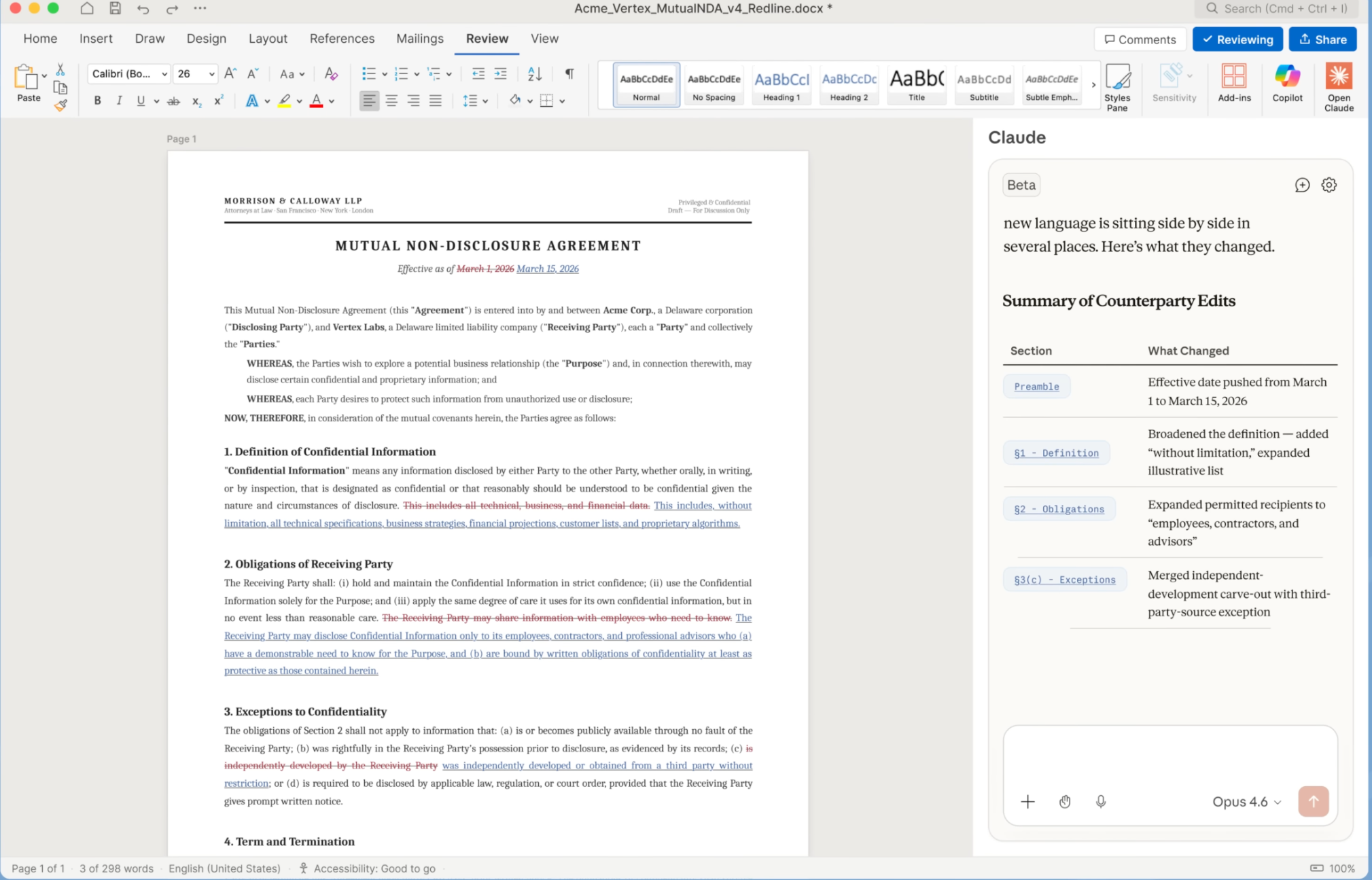
Claude for Word
Claude for Word is an Anthropic add-in that brings Claude into Word. Using Claude in Word means working in a sidebar beside your document, where Claude edits and drafts text in the document’s own styles. Claude also answers questions about the document, with clickable citations that take you to the source sections.
You can install Claude for Word from its own listing on Microsoft Marketplace or from the Claude for Microsoft 365 listing, which also covers Excel and PowerPoint. Your admin can also deploy it to your organization through the Microsoft 365 Admin Center.
What it does in a document
Claude for Word reads the open document and carries out the instructions you type in the sidebar, including:
Editing a passage you select while keeping the formatting of the surrounding text, including its styles and numbering.
Showing each edit as a revision in Word’s review pane when tracked changes mode is on, for you to accept or reject.
Editing the text a comment is anchored to and replying in the comment thread with what it changed.
You can also enable Skills in your settings. A Skill gives Claude specialized knowledge and workflows for a task, and Claude determines which Skills your request needs.
Plans, install, and where it runs
Claude for Word is available on Pro, Max, Team, and Enterprise plans. It runs on Word on the web, Word on Windows with a Microsoft 365 subscription (Version 2205 or later), and Word on Mac (version 16.61 or later).
It does not run on perpetual or volume licenses of Word 2016 and 2019, or on Word on iPad or Android. To use Claude for Word on a legacy .doc document, you need to save it as .docx first.
When you sign in with a Claude account, Claude for Word sends your conversations to Anthropic. An organization can also route those conversations through its own cloud platform or gateway. Its administrator connects the add-in to Amazon Bedrock, Google Cloud Vertex AI or Azure AI Foundry, or to a large language model (LLM) gateway.
An LLM gateway is software the organization runs to send each request to the provider it chooses. For Bedrock and Vertex AI, the administrator also chooses the cloud region where Claude processes the requests. Users in this setup do not need individual Claude accounts.
Where Claude for Word is strong
Claude for Word drafts and edits text in a document and answers questions about it. For example, it can:
Fill templates with drafted sections in the document’s own heading and paragraph styles, and populate tables in place without changing column widths.
Find thematic matches for a topic such as data retention, and take you to each matching passage when you click a result.
Recognize document patterns such as defined terms and cross-references.
What Is PerfectIt?
PerfectIt
PerfectIt is a Microsoft Word add-in that checks consistency and house style in specialist documents such as clinical study reports and proposals. You launch PerfectIt from its tab in Word’s ribbon, and the sidebar that opens next to the document runs one check at a time. Each check looks for one kind of issue across the whole document.
For each check, such as Capitalization of Phrases or Spelling Variations, PerfectIt shows every instance of an inconsistency in the document. The add-in uses no AI, which means no language model processes your document. PerfectIt does not write or rewrite your text.
More than 20,000 users in 72 countries rely on PerfectIt to improve their documents. The medical writing teams at 80% of the world’s largest pharmaceutical firms use PerfectIt. It is the only official proofreading software for both The Chicago Manual of Style and Microsoft Writing Style. Checking against The Chicago Manual of Style requires a separate subscription to CMOS Online, the online edition of The Manual.
The consistency checks
PerfectIt runs consistency checks across the whole document to find inconsistencies. It shows each location where an inconsistency appears, and you decide what to correct.
A. Acronym definition
PerfectIt has separate checks for acronym definition problems, including these three:
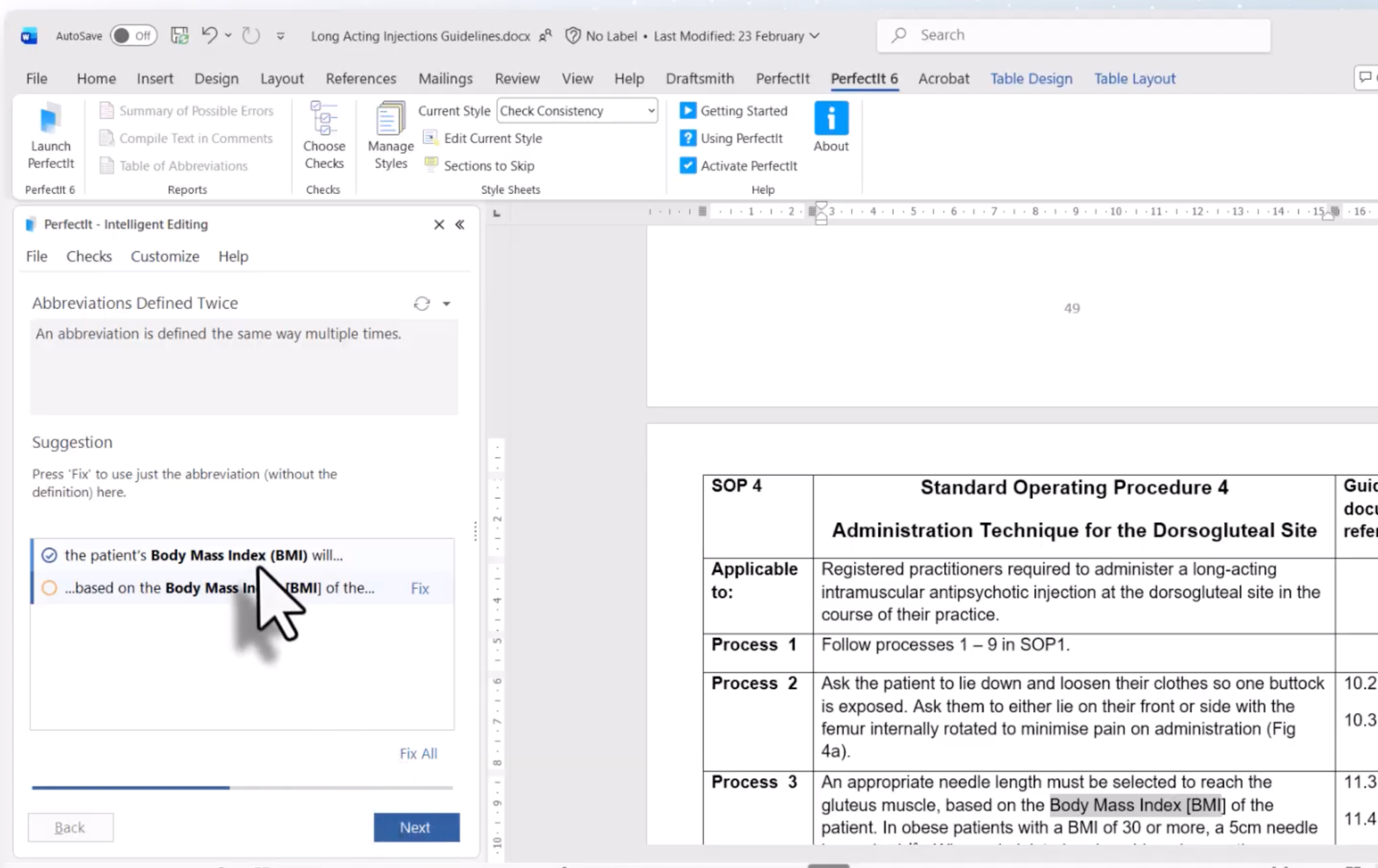
Acronym definition
The Abbreviations Used Before Definition check finds an acronym used before its definition, such as SLA appearing in one section and Service Level Agreement (SLA) appearing in a later one. This requires you to move the definition to the section where SLA first appears.
The Abbreviations Defined Twice check finds an acronym defined twice or more, such as Service Level Agreement (SLA) written out in two sections. You keep the definition in one section and remove it from the other.
The Abbreviations Without Definitions check finds an acronym used but never defined, such as SLA appearing with no definition anywhere in the document. You add the definition at the first use.
PerfectIt can also create a table of acronyms that lists every acronym in the document. You read the table to decide where each acronym needs a definition.
B. Capitalization and hyphenation
Capitalization of Phrases and Hyphenation Consistency show where a term appears in two different forms. You can then choose to write the term the same way throughout the document.
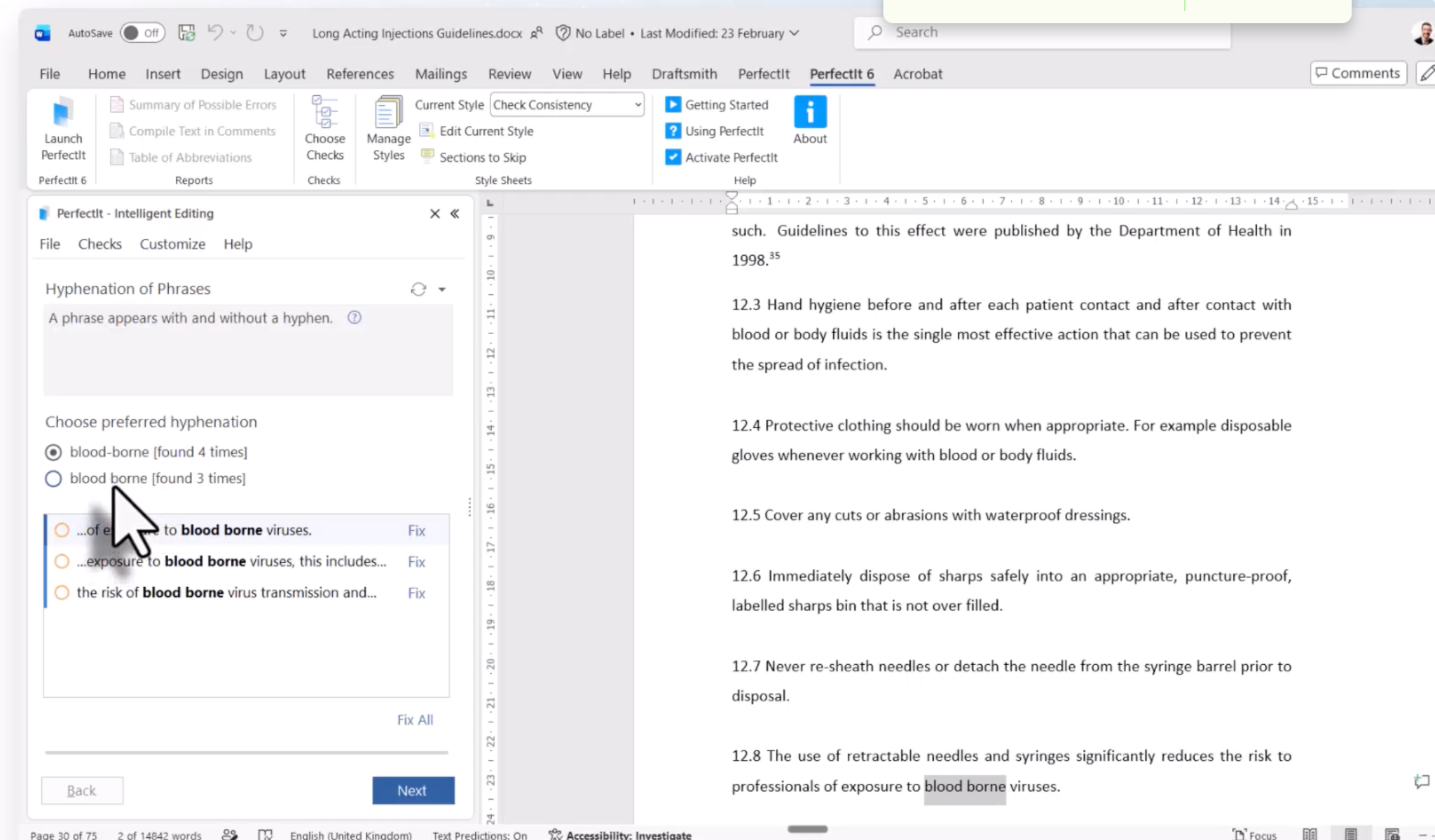
Capitalization and hyphenation
Capitalization of Phrases: PerfectIt shows each location where the same term has initial capitals in one place and lowercase in another, such as “Steering Committee” and “steering committee”.
Hyphenation Consistency: PerfectIt shows each location where the same word appears hyphenated in one place and unhyphenated in another, such as “short-term” and “short term”.
C. Checking inconsistencies
PerfectIt has a list of 34 checks that you start on a document to find where it is inconsistent. Examples beyond those above include:
The Bullet/List Punctuation check finds items in a bulleted or numbered list that end with different punctuation.
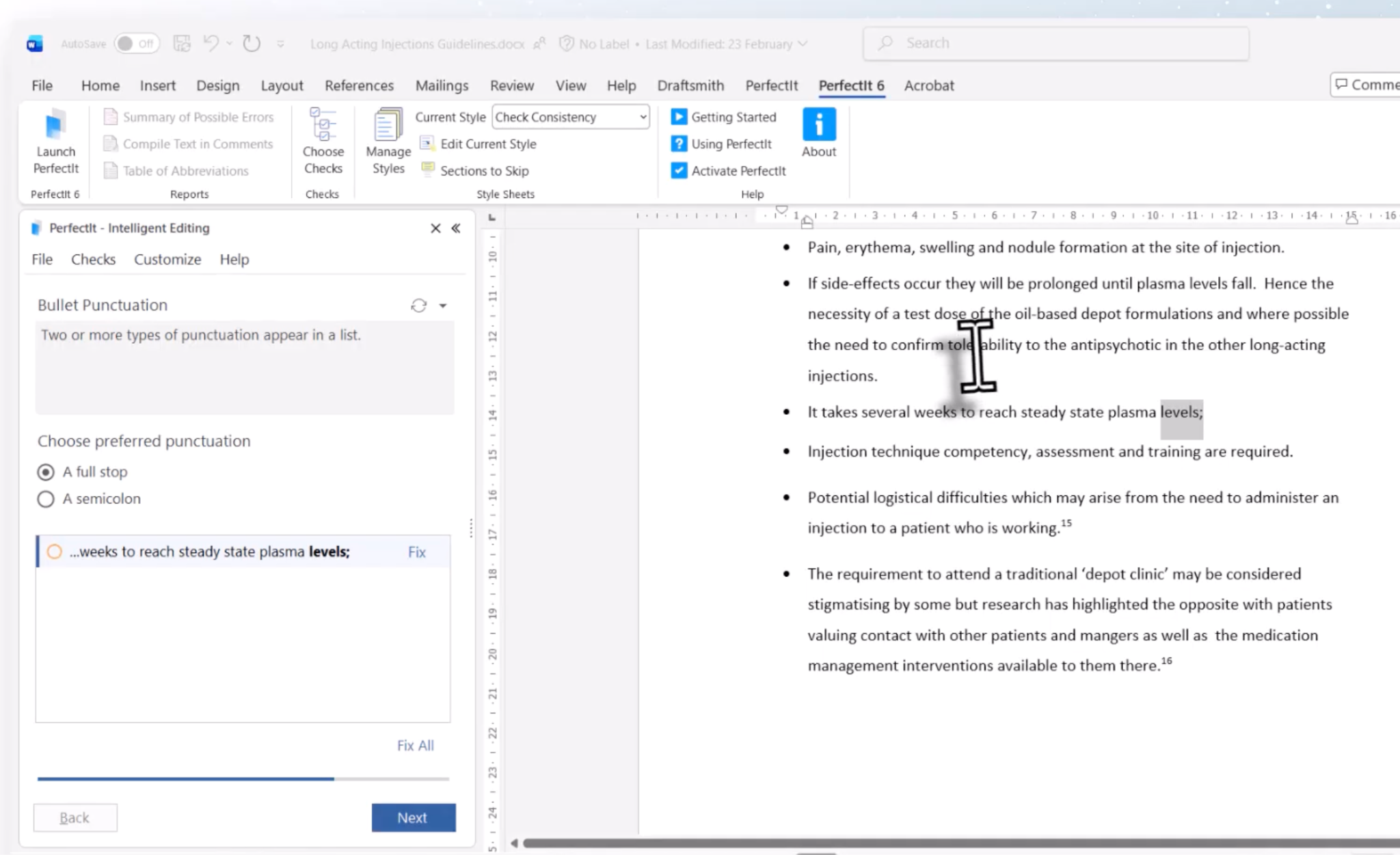
PerfectIt Punctuation check
US and UK spellings mixed in one document, such as “color” and “colour”.
Numbers in the middle of sentences written as a word in one location (e.g. six) and as a digit in another (e.g. 7).
Tables and figures titled inconsistently or numbered out of order.
House style
Build your house style into PerfectIt once using Styleworks, and apply it to every document. Styleworks is a free tool that turns a house style into checks for PerfectIt, and it works in three steps:
You log each style decision in Styleworks as you edit.
Styleworks turns those decisions into preferences.
PerfectIt applies the preferences across the document.
A house style built on a published style guide needs rules only where your organization differs from that guide, such as how to write brand names or which client terms to use.
A house style can also state which term every document must use for a concept. Medical writers use this kind of rule to decide which word refers to a person in a clinical trial. In a clinical trial, “patient,” “participant,” and “subject” are not interchangeable, and someone who chooses to take part is usually a “participant.” You only need to log that terminology choice once, and the Preferred Spelling check shows each location where a document uses a different term.
Context and exceptions
PerfectIt shows each location in the document where a check finds an inconsistency. Then you decide which of those locations need changes.
Some inconsistencies are intentional, such as:
A quotation that keeps the spelling of its source, like “colour” inside a report written in US spelling. PerfectIt’s Sections to Skip option leaves text in quotation marks out of the checks when you select the box for that quotation mark type.
A term that changes form on purpose, like “Steering Committee” capitalized when it names your committee and “steering committee” in lowercase when it names committees in general. Depending on your style, both the capitalized and lowercase forms can be correct.
Only the person reading each location can tell a deliberate choice from a mistake. This is why PerfectIt shows each location and does not change text on its own.
PerfectIt vs Claude for Word: Head to Head
PerfectIt checks the whole document for inconsistencies and against your style rules, showing each location without changing any text. In Claude for Word, the prompt you write defines the check, and Claude edits the text you select.
The head-to-head comparison below shows how each tool answers the five questions, starting with where your documents go.
Confidentiality and security
PerfectIt for Windows never connects to the internet. Moreover, PerfectIt does not use AI, so your confidential documents stay on your computer and never train a model. Its Windows edition does not connect to any local network either.
On the other hand, Claude for Word sends the content of your open document to Anthropic, or to your organization’s chosen provider when it connects through a third-party platform. It also reads the content of the document you have open, including comments and tracked changes.
Anthropic documents the following about it.
Data location: Documents that contain personal data fall under rules on where that data can go. The EU’s General Data Protection Regulation sets conditions for transferring personal data outside the European Economic Area, and Canada’s Personal Information Protection and Electronic Documents Act holds the sending organization accountable for personal information that it sends abroad for processing. Anthropic’s documentation for Claude for Word does not state the country or region where conversations are processed or stored when you sign in with a Claude account. An organization that needs control over location can connect the add-in to Amazon Bedrock or Google Cloud Vertex AI, where the administrator sets the cloud region for requests.
Data retention: Anthropic deletes inputs and outputs from its backend within 30 days of receipt or generation, except in the cases it lists. After deletion, Anthropic caches data for a number of hours so you can access context in recently closed documents. Chat history is stored in your browser, and Anthropic also keeps your conversations under its retention policy.
Retention settings and audit logs: Claude for Word does not follow the custom data retention settings set by your organization. Enterprise audit logs do not record its activity, but an administrator can send its activity to the organization’s own monitoring system through a custom OpenTelemetry collector. The Compliance API (application programming interface) includes Claude for Word sessions for Enterprise organizations that enable it.
Third-party platforms: When an organization connects through Amazon Bedrock, Google Cloud Vertex AI, Azure AI Foundry, or a large language model (LLM) gateway, prompts and responses go only to the inference provider it chose.
Prompt injection: Documents from external sources can contain hidden instructions, and Anthropic’s testing found that Claude for Word can be manipulated into extracting sensitive information through web searches.
Training: Anthropic does not train its models on chats from its commercial products (Team, Enterprise, and API) unless you join its Development Partner Program. On Pro and Max, you can allow Anthropic to use your chats for training. Anthropic then keeps that data in a de-identified format in its model training pipelines for up to 5 years.
Anthropic advises following your organization’s data handling policies for highly sensitive or regulated data, and using Claude for Word only with trusted documents. PerfectIt is not AI, which means no model trains on your confidential documents.
It is easier to get corporate approval for a product like PerfectIt for Windows because it does not send your text anywhere. The PerfectIt security brief states that the Windows edition never stores your data or sends your data anywhere.
Approving Claude for Word requires a security review of where its document content goes and how long the provider keeps it. The list above shows what Anthropic documents on both points.
Kimberli Balfour, Senior Proposal Manager at Microsoft Corporation, said: “PerfectIt’s inexpensive pricing and security model made it easy to get corporate approvals.”
The same result every time
A deterministic tool returns the same output every time it receives the same input. PerfectIt is not an AI tool and applies your rules the same way every time, which means the same document gives the same results on every check. The house style preferences you build in Styleworks stay the same until you change them.
Claude for Word is a generative AI assistant that writes each answer from your prompt. Anthropic’s glossary states that identical inputs might produce different outputs across API calls, even with temperature (the setting that controls randomness) set to 0.
In Claude for Word, the prompt you write defines the check. Anthropic’s guide to making Claude’s outputs more consistent describes prompt techniques, such as specifying exact formats and constraining answers with examples.
Consistency across the whole document
Consistency checks are possible using both tools, but how they do that task differs. PerfectIt finds the same inconsistencies and lists every instance each time you check the same document. What Claude for Word finds depends on the prompt you write.
Anthropic provides consistency prompts for Claude for Word, such as asking it to find defined terms used inconsistently and to check whether one party is referred to by different names.
On consistency, PerfectIt and Claude for Word differ in three ways:
Coverage: PerfectIt has 34 checks, each looking for one kind of issue, such as Hyphenation Consistency or Abbreviations Used Before Definition. Claude for Word checks for the kinds of inconsistency you describe in your prompt, such as a defined term written “Effective Date” in one section and “effective date” in another.
Results: PerfectIt lists each instance it finds in the document. Claude for Word answers in text, with clickable citations to the sections it used.
Review: Claude for Word drafts and edits text, and Anthropic advises human review of its output before a final client deliverable goes out. PerfectIt does not generate text. It shows each location where it finds an inconsistency. You decide what to correct.
House style
In PerfectIt, your house style is a set of rules you build in Styleworks, and PerfectIt checks the document against them. In Claude for Word, your house style is an instruction in Settings or a Skill, and Claude decides when a Skill applies based on what you ask.
Where it applies: Instructions you set in Claude for Word apply only to Word, and they are separate from those you set in Claude for Excel or PowerPoint. A house style built in Styleworks works in PerfectIt for Windows and in PerfectIt Mac Edition.
Built-in styles: PerfectIt is the only official proofreading software of The Chicago Manual of Style and Microsoft Writing Style, and it includes built-in US, UK, Canadian, and Australian spelling styles you can apply without building anything. In Claude for Word, you need to write instructions manually, such as “use formal tone.”
Who makes the decision
With both tools you make the final decision at different points in the process.
PerfectIt shows you each inconsistency it finds and the part of the document that contains it, and you decide whether to make a change.
Claude for Word edits the text you choose after you instruct it what to change. In tracked changes mode, each edit appears as a revision that you accept or reject in Word’s review pane, and Ctrl+Z (Cmd+Z on Mac) undoes an edit.
Claude’s edits arrive as fluent, finished-looking text such that even the wrong change can be read as correct. Anthropic’s documentation for Claude for Word tells you to review tracked changes before accepting them and to verify that outputs match your specific requirements. This verification is where the human reviewers take over and make a decision on what stays in the document.
PerfectIt never changes text on its own. Quotations stay exactly as written, because changing someone else’s words is not PerfectIt’s job. A term that you vary on purpose also stays as written, and only the person reading each location can tell a deliberate choice from a mistake.
PerfectIt is designed for situations where a person decides each change. Claude for Word is a natural pick when you want the tool to make the edits and good enough work is the goal. When the goal is the best work you can produce, PerfectIt is the better pick because it is built around human review. Claude for Word also checks more kinds of things than PerfectIt, such as grammar, which means the right pick depends on what you are looking for.
Who Should Choose Claude for Word
Choose Claude for Word when the job is writing or reviewing the text of a document. Before you use it, your IT and compliance teams need to approve sending that text to Anthropic or to your organization’s chosen provider.
Use Claude for Word if you are looking to:
Draft a section from a template, where the new text takes on the template’s heading and paragraph styles. You do not need to restyle it manually.
Tighten or simplify a text passage you select. Claude edits only that text and keeps the styles and numbering around it.
Ask questions about a long document. Each answer carries a clickable citation to the section it came from, enabling you to check the answer against that section.
Who Should Choose PerfectIt
Organizations whose long specialist documents have many contributors benefit from PerfectIt because it finds where contributors wrote the same term or acronym in different ways. It also checks the document against the house style you build in Styleworks, which gives every section the same preferences.
PerfectIt also suits teams that want a lot of custom control. You set your rules once in Styleworks, and PerfectIt shows each location where the document differs from them. For example, if you tell Claude to define an acronym at its first use, the first use might appear in a heading where you do not want a definition. In PerfectIt, the Abbreviations Used Before Definition check shows each acronym that is used before it is defined, and you decide where the definition goes. A team that needs each change to be right will prefer this approach, because a person makes each one.
Three groups of users work with many contributors and decide for themselves how to resolve each inconsistency.
Medical writing teams: PerfectIt is software for medical writers. In clinical study reports and protocols, many writers contribute to one document. Terminology and acronyms have to remain consistent from the first section to the last. In such scenarios, PerfectIt helps you spend less time on mechanical fixes, helping the team focus on the science.
Proposal and bid teams: A proposal written by many people needs to read as if it’s written in one voice. PerfectIt finds problems that take away from that sense, including acronyms with definition issues and terms that contributors wrote in different ways. The result is proposal teams that require fewer review cycles and proposals that make a better impression on evaluators. Manisha Kaneri, Publishing Team Lead at BidExecs, said: “For proposal work, PerfectIt is the best in its class.”
Government publications teams: Teams in government publications have to make documents written by multiple authors follow one style guide, such as a department manual built on the US Government Publishing Office (GPO) style. PerfectIt includes GPO as a built-in style that a team can customize with its department’s own rules. For example, GPO style prefers using the word “adviser.” But a Department of Justice document still has to keep the job title “Attorney-Advisor.” In PerfectIt for Windows, the team can edit the GPO style so that PerfectIt stops suggesting “Adviser” in place of “Advisor.” PerfectIt users include government departments and offices of the inspectors general.
PerfectIt Pricing and Free Trial
PerfectIt offers an annual per-user subscription with four plans: Professional, Elite, Team, and Enterprise.
Current prices for every plan are on the PerfectIt store.
The 14-day free trial of PerfectIt needs no credit card and lets you test the product on your own documents before you buy.
Book a demo or consultation to see how PerfectIt fits your team’s documents and your house style.
FAQs
What is Claude for Word?
Claude for Word is Anthropic’s AI add-in for Microsoft Word. It answers questions about the open document and drafts or edits its text from a sidebar. It is available on Pro, Max, Team, and Enterprise plans.
Is PerfectIt or Claude for Word better for consistency and house style?
PerfectIt. It checks the whole document for inconsistencies and against the house style you build in Styleworks, and it shows each inconsistency it finds. Claude for Word drafts and edits text.
Is Claude for Microsoft Word safe for confidential documents?
Claude for Word sends the content of your open document to Anthropic, or to your organization’s chosen provider on a third-party platform. Anthropic advises following your organization’s data handling policies for highly sensitive or regulated data. PerfectIt for Windows works offline all the time, which means your documents never leave your computer.
Does Claude for Word use tracked changes?
Yes. In tracked changes mode, each edit appears as a revision that you accept or reject in Word’s review pane.
Does PerfectIt use AI?
No. PerfectIt does not use AI. It checks your text and never writes or rewrites it.
Does PerfectIt check grammar?
No. PerfectIt checks consistency and house style, such as an acronym used before its definition or a term written two ways in one document.
