
PerfectIt: The Best Trinka Alternative for Medical Editing
TL;DR: The best Trinka alternative for medical writing is PerfectIt, a consistency and house style checker that doesn’t use AI.
Trinka AI is an AI grammar tool for academic and medical writing, with a grammar checker, language and style suggestions, a consistency checker and citation tools in its suite. But it falls short for medical writing teams when the document is an unpublished trial report or a regulatory submission.
For medical writers, PerfectIt is the best Trinka AI alternative because it applies your rules the same way every time and lets you build in your own preferences, including those from AMA.
PerfectIt is not a grammar checker. It doesn’t rewrite text and it has no AI. Below is a side-by-side comparison of Trinka AI and PerfectIt. Read on to also see the three reasons medical writing teams switch.
You can also book a demo or consultation to see how PerfectIt checks the consistency and house style of your documents.
| Criteria | PerfectIt | Trinka AI |
|---|---|---|
| How it checks | Applies your rules the same way every time. Same document, same findings, every time | With AI model suggestions |
| What it checks | Consistency and house style: acronyms, hyphenation, capitalization, spelling variants, numbers in sentences, tables and figures. Not grammar | Grammar, language and style suggestions, consistency checks, citation tools |
| AMA Manual of Style | Not built in. You build your AMA preferences into PerfectIt (in Styleworks) and apply them to every document | Style guide based corrections on paid plans, with APA, AMA, ACS, AGU and IEEE listed |
| Data and confidentiality | PerfectIt for Windows works entirely offline on every plan; documents are never sent anywhere. | Free Basic plan data used for AI training; paid plans not used for training, with 90-day auto-deletion. Offline app, real-time deletion and SOC2, HIPAA, ISO and GDPR compliance on the Confidential Data plan ($500/yr) |
| Limits | No monthly word cap | Basic capped at 5,000 words a month. File proofreading uses monthly credits on every plan, including Confidential Data |
| Where it works | Microsoft Word add-in: PerfectIt for Windows, and PerfectIt Mac Edition for Mac, iPad and Word Online. PowerPoint on Elite, Team and Enterprise plans | Cloud editor, browser extensions and Windows app; MS Word add-in from Premium |
| Price from | Annual, per-user subscription with four plans: Professional, Elite, Team, and Enterprise. Check the live store for current prices. The 14-day free trial gives full access and asks only for an email address. | Free Basic; paid Premium, Premium Plus and Confidential Data ($500/yr) plans |
What Is Trinka AI, and Why Do Medical Teams Look for an Alternative?
What Trinka Does
Trinka AI is an AI writing and grammar assistant which focuses on academic and technical writing. Its strength is language: its corrections help professionals and academics write in a formal, concise style.
The Trinka grammar checker sits alongside consistency checks and citation tools. You can use it in a cloud editor, in browser extensions, in a Windows app, and in a Microsoft Word add-in on paid plans.
For individuals, Trinka has four plans: free Basic, Premium, Premium Plus and Confidential Data. Confidential Data is the top tier, and it adds an offline app, real-time data deletion and compliance with standards such as SOC2, HIPAA and GDPR. Teams of five or more can get a Confidential Data plan by quote, and Trinka also markets a Confidential Data plan to medical users.
Where medical writing needs something different
Medical proofreading has different requirements from general editing, and those requirements are worth weighing when you choose a tool.
Medical and regulatory documents need repeatable, auditable checks against a defined house style. A clinical study report passes through several writers and more than one round of quality control, and every writer and reviewer needs to apply the same rules.
An AI suggestion can differ for the same issue in two documents. If a quality control (QC) reviewer asks why a term was changed in one document and not the other, there’s no rule to explain it because AI isn’t rules-based.
Confidentiality is the other concern. Unpublished trial data and submission drafts raise questions that IT and compliance teams must sign off on. Until they do, the tool is not approved for use on those documents.
Looking for a Grammar Checker With No AI? What Medical Writers Actually Need
Some medical writers are barred from pasting confidential drafts into AI tools, so they try to find tools that don’t use AI. Regulated teams usually need something other than another grammar checker or AI rewriter.
They need a consistency and house style checker that still leaves them in complete control. PerfectIt is that kind of checker.
Where PerfectIt fits
As a consistency and house style checker, PerfectIt runs inside the Word document you already have open. It follows the house style rules you set, without using AI.
PerfectIt reads and checks your whole document and flags each inconsistency after you launch it. These include spelling variants, hyphenation, capitalization, numbers in sentences, acronyms and your house style preferences. You then check an item that is flagged and then decide whether to change it or not.
Being rules based also makes PerfectIt repeatable, and that is the main reason it suits medical documents. It applies your rules the same way every time, so the same document produces the same findings on every check. If a QC reviewer checks again after revisions, the same rules apply as in the first check.
Reason 1: Confidentiality for Unpublished Trial Data
The IT approval problem
For medical editing, cloud tools that process unpublished trial data usually need IT and compliance review first. Until that review is done, the tool is not approved for the documents that matter most.
Trinka’s data handling depends on the plan:
Basic (free): Your data is used for AI training.
Premium and Premium Plus (paid): Documents are processed in the cloud and deleted automatically after 90 days.
Confidential Data (top tier): This adds an offline app, real-time deletion, and SOC2, HIPAA, ISO and GDPR compliance. A team version for five or more users is available by quote.
With Trinka, offline checking is a top-tier upgrade. With PerfectIt, offline checking on Windows comes with every plan.
How PerfectIt handles confidential documents
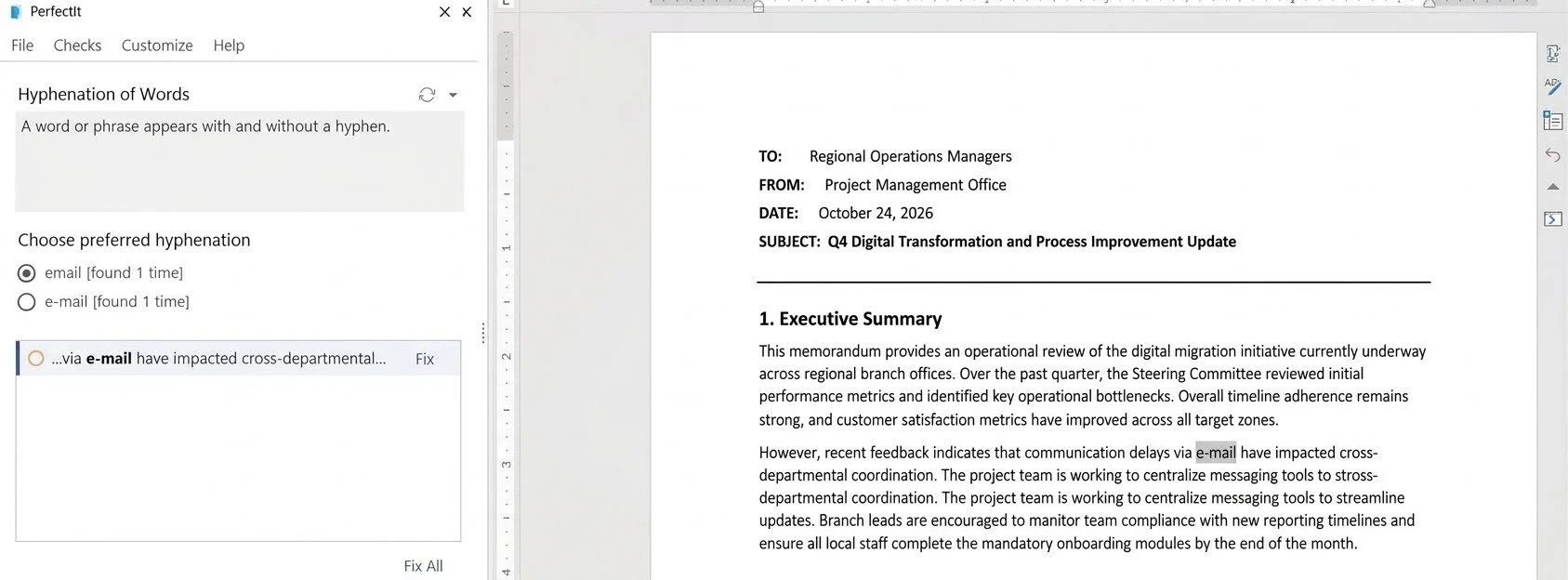
After you install it, PerfectIt for Windows works offline. It doesn’t connect to the internet while you check a document, so your documents are never sent anywhere.
There’s a second reason PerfectIt suits confidential documents: it is not AI. Your documents are never used for training, and they never go to an outside model or server of any kind. That matters for approval, because IT and compliance teams find it easier to approve software that doesn't send your documents anywhere.
Reason 2: AI Suggestions vs Rules You Define
Why explicit rules matter in medical editing
Trinka is designed to improve the language of academic and technical writing, and it does that with AI assistance. PerfectIt has a narrower focus: checking consistency and your house style, with the same results in every document.
That matters in medical editing, because QC reviews check documents against a style guide and a checklist. PerfectIt gives the same results every time, while generative AI tools can return different results for the same input, even with the same settings. AI cannot promise a repeatable check.
With PerfectIt, every preference you build into your house style is visible, editable and applied the same way across every document.
Enforcing the AMA Manual of Style consistently
The AMA Manual of Style is the house style for many medical journals and publications teams. You can build your AMA preferences into PerfectIt in Styleworks and apply them to every manuscript.
Drug names are a good example of what you can build in. AMA style lowercases generic drug names and capitalizes brand names. To keep capitalizing drug names consistent, you add each drug name to your house style. PerfectIt then flags it wherever it is capitalized differently, for you to review.
Trinka takes a different approach. It lists AMA among its style guide corrections on paid plans, and its AI-powered checker applies them. A trained model approximates a style guide from patterns it has learned, which isn’t the same as building in rules.
PerfectIt applies the AMA rules you build in exactly as you wrote them, in every document.
Abbreviations and acronyms
Medical documents are dense with abbreviations. PerfectIt finds acronyms used before they are defined, acronyms defined twice, and acronyms that haven’t been defined. It flags each location for you to review. PerfectIt can also generate a table of acronyms for the document.
This fits AMA preferences on abbreviations. AMA style asks you to define an abbreviation at first mention, with the full term first and the abbreviation in parentheses, and to use the abbreviation after that. PerfectIt shows you each location that doesn’t follow that pattern which is ideal for situations where you’re managing medical abbreviations across a long document with several writers.
Reason 3: Credit Limits and High-Volume Checks
How Trinka limits usage
Grammar and language checking is unlimited on Trinka’s paid plans, while Basic is capped at 5,000 words a month. Some features work differently. File proofreading uses monthly credits on every plan, including Confidential Data, and so do the citation checker and advanced plagiarism reports.
The allowance depends on the plan. Premium allows up to 120 proofread files a year, Premium Plus up to 240, and Confidential Data up to 600.
Those numbers assume files of 5,000 words or fewer, because Trinka charges one credit per 5,000 words. A 50,000-word report uses 10 credits for one proofread, which is a full month of Premium’s free credits. Extra credit packs can be bought at any time, and purchased credits do not expire.
That matters for medical writing teams. A clinical study report or a submission module can run to hundreds of pages, and QC checks happen more than once, so every pass draws on the same allowance.
How PerfectIt handles volume
PerfectIt has no per-check credits or word cap, so you can launch it on the full document at whichever stages your review cycle needs. Some writers launch it early, others launch it after revisions, or as the last check before the document gets submitted.
PerfectIt for Regulatory Medical Writing
Consistency across submission documents
Regulatory medical writing covers documents such as clinical study reports, protocols, investigator brochures and submission modules. PerfectIt flags these kinds of issue in them:
Terminology that varies between sections. PerfectIt’s Phrases to Consider check flags words such as “subject” once you add them, so you can confirm that “participant” was not intended.
Acronyms that are used before they are defined, or never defined.
Numbers in sentences, where one is spelled out (“one”) and another is written as a digit (“1”).
Tables and figures that are not titled consistently or are not in numerical order.
Regulatory teams looking for proofreading software for the pharmaceutical industry usually want these checks. That's why PerfectIt is used at three-quarters of the world's largest pharmaceutical firms across their entire medical writing teams, as do medical writers at Cancer Research UK’s Centre for Drug Development.
PerfectIt helps you spend less time on these mechanical fixes so you can focus on the science. To see the acronym and terminology checks in use, watch PerfectIt’s video on editing medical publications and regulatory submissions.
Auditability
PerfectIt applies the same rules the same way every time. If a QC reviewer checks the same document again, the findings are the same, which supports QC documentation.
Every decision stays with the user. PerfectIt flags each location, and the user chooses to accept or reject it. PerfectIt never makes an editorial call on its own.
PerfectIt also produces reports for QC records. The Summary of Changes lists the issues found and the changes made, and you can paste it into any document. The Summary of Possible Errors lists the potential issues in one document, and you can run it before you start checking.
PerfectIt for Medical Publications and Manuscripts
Medical writing covers journal manuscripts, posters, abstracts and plain language summaries. PerfectIt can check them against your built AMA preferences or the journal's own house style before you submit any of them.
PerfectIt’s guide to manuscript editing software for medical publications teams covers this in more detail.
How to Switch From Trinka AI to PerfectIt
Step 1: Install PerfectIt and start the free trial
Install PerfectIt to get started. You run the PerfectIt installer on Windows or you get the PerfectIt Mac Edition from Microsoft Marketplace. You can find the requirements for each on PerfectIt’s site.
Then start the 14-day free trial, which gives you full access. You only need to enter your email address. No purchase and no credit card details are required.
Step 2: Build your preferences from AMA style into PerfectIt
The default consistency checking works straight out of the box with no setup. If you want to go further, build your preferences from AMA style into PerfectIt in Styleworks, such as drug name capitalization, abbreviation rules and numbers.
Step 3: Launch PerfectIt and review each inconsistency
Launch PerfectIt on the full document. It flags each inconsistency and its locations, and you decide what to do with each one: accept, reject or edit. Nothing changes without your decision. After you revise, you can launch it again to check the document once more.
PerfectIt Pricing vs Trinka AI Pricing
PerfectIt pricing
PerfectIt is an annual, per-user subscription with four plans: Professional, Elite, Team, and Enterprise. Check the live store for current prices. The 14-day free trial gives full access and asks only for an email address: no purchase, no credit card, and no other personal information.
You can also book a demo or consultation to see how it works.
Every PerfectIt plan gives you the same three benefits. Consistency: PerfectIt applies your rules the same way every time. Confidentiality: it works offline on Windows, so your documents never leave your computer. It has no AI, so the documents never go to an outside model. Usage: there is no word cap on the documents you check.
Trinka AI pricing
Trinka AI pricing starts with Basic, which is free and allows 5,000 words a month. Trinka’s commitment not to use data for AI training covers paid plans, so it doesn’t cover Basic.
Premium and Premium Plus are paid plans, billed monthly or yearly. Trinka runs discounts on its plans, so its pricing page has the current figures.
Confidential Data is the top plan. It includes the offline app, real-time data deletion and no AI training. Its regular price is $500 a year. A team version for five or more users is priced by quote.
Pros and Cons of PerfectIt for Medical Editing
Pros
PerfectIt applies your rules the same way every time, so findings are repeatable for QC.
It works offline on Windows on every plan, so documents are never sent anywhere.
You build your AMA preferences or house style into PerfectIt once and you can share it across your team.
It works inside Word, where medical writing teams already edit.
Cons
AMA is not a built-in style, so teams build AMA preferences into PerfectIt first.
It’s not a grammar checker, and it doesn’t rewrite sentences or generate text.
Who Should Choose PerfectIt Over Trinka AI
PerfectIt began as software for professional editors, and its users now also include regulatory writers, publications teams, and pharma, biotech and medical device teams.
Regulatory writers and QC reviewers who work on submission documents need repeatable checks. PerfectIt applies your rules the same way every time, so a second check of the same document gives the same findings.
Kate McKiernan, who edits regulatory submissions for pharmaceutical companies, says every submission goes through several rounds of review, and “PerfectIt saves me time on each of them.”
Publications teams and medical communications agencies often enforce AMA or a client house style across many manuscripts. They build that style into PerfectIt once and check every manuscript against it.
Pharma, biotech and medical device teams sometimes work under an IT or compliance policy that restricts cloud AI tools for unpublished trial data. PerfectIt doesn’t use AI, and your documents stay on your computer.
Frequently Asked Questions
Is PerfectIt an AI tool?
No. PerfectIt applies your rules the same way every time. It checks a document for consistency and house style and flags each inconsistency for you to decide on, with no AI model involved.
Is there a grammar checker with no AI for medical writing?
PerfectIt is not a grammar checker. If you need a no-AI check for medical writing, PerfectIt checks consistency and house style: acronyms, capitalization, hyphenation, numbers and the AMA preferences you built. It works offline on Windows.
Does PerfectIt check AMA style?
Yes, once you build your AMA preferences into PerfectIt, as AMA isn’t one of PerfectIt's built-in styles.
Is PerfectIt safe for confidential or unpublished trial data?
PerfectIt for Windows works offline after you install it. It doesn’t connect to the internet while you check a document, so your documents are never sent anywhere. PerfectIt Mac Edition keeps your documents on your computer. Because PerfectIt isn’t AI, your documents are never used for training and never go to an outside model.
How much does Trinka AI cost?
Trinka has a free Basic plan capped at 5,000 words a month, plus paid Premium and Premium Plus plans billed monthly or yearly. Confidential Data is the top plan, with the offline app and real-time data deletion. Its regular price is $500 a year. Trinka runs discounts, so check its pricing page for current prices.
Can medical teams share their house style in PerfectIt?
Yes. Your medical team can share one house style with PerfectIt, so everyone checks against the same rules.
Final Verdict
For medical writing, PerfectIt is the best Trinka AI alternative for teams that need a check with no AI, offline checking on Windows on every plan, and a house style they can control.
It suits regulatory writers, publications teams, and medical communications agencies.
PerfectIt doesn’t include a built-in AMA style, although you can build it through Styleworks. It also doesn’t have grammar checking or sentence rewriting. That is by design, since you make every decision.
