

Grammarly Pro is a strong writing assistant, and for grammar, clarity, and tone across almost any app, it is hard to beat. For professional teams whose documents are confidential and have to strictly follow a house style from the first page to the last, PerfectIt is the better fit. It goes straight to consistency and house style across the whole document and doesn’t use AI. PerfectIt for Windows also works entirely offline, so your documents are never sent anywhere.
If you write clinical study reports, bid responses, or government publications, this comparison is for you. It’s also for the colleague in IT, security, or procurement who has to approve the tool your team picks.
Grammarly Pro is Grammarly's paid plan for individuals and teams. Beyond grammar and AI writing help, it adds team features such as style guides and brand tones. PerfectIt is often grouped with professional proofreading software, but it sticks to two tasks: consistency and house style.
This is a comparison of two serious professional tools that are built with a different focus.
| Criteria | PerfectIt | Grammarly Pro |
|---|---|---|
| Built for | Consistency and house style across long specialist documents in Word and PowerPoint | Grammar, clarity, and tone, plus generative AI writing help, across almost any app |
| Confidentiality | PerfectIt for Windows works entirely offline and never sends your documents anywhere. PerfectIt Mac Edition keeps documents on your computer | Cloud based and needs an internet connection. Text is processed on US servers hosted by AWS. Product Improvement and Training is on by default for single-user and self-serve team Pro accounts, and can be switched off |
| AI | None. Applies your rules the same way every time, so you get the same result on every check | AI suggestions, full-sentence rewrites, 2,000 AI prompts a month, and AI agents |
| House style | Build your house style into PerfectIt in Styleworks and apply it to every document. It is the only official proofreading software of The Chicago Manual of Style (for users with a CMOS Online subscription) and Microsoft Writing Style | One style guide and one brand tone on Pro. Unlimited on Enterprise |
| Whole-document consistency | Goes straight to consistency across the whole document, one check at a time: acronym definitions, capitalization, hyphenation, bullets and lists, spelling, numbers in sentences, tables and figures | Reviews the whole document, with consistency suggestions for dates, capitalization, spelling, hyphens, and acronyms shown alongside grammar, tone, and AI writing suggestions |
| Where it works | Microsoft Word add-in. PowerPoint on Elite, Team, and Enterprise (Windows only) | Browser extension and desktop apps across Word, Outlook, PowerPoint, and many other apps |
| Price | From $10 per user a month, billed annually (Team from $13). Discounts are available for members of professional associations. 14-day free trial with only an email address. | $12 per member a month billed annually, or $30 billed monthly, for up to 149 seats |
How PerfectIt and Grammarly Pro Were Evaluated
Both tools were compared on what a professional team has to get right before a document goes to a client, an evaluator, or a regulator. Confidentiality comes first. IT and procurement usually ask about it before anything else, and it’s where the two tools differ most.
Writing well and checking a finished document are different tasks, so it helps to separate them before comparing anything. Grammarly Pro is the better tool for grammar and AI writing help. PerfectIt is the stronger tool for consistency and house style, with your documents kept offline.
Your team's priorities decide which of those matters more. Here are the six points to check before you pick either tool.
Confidentiality and data handling
This matters most: where your text goes when a tool checks it. Some tools work on your own computer, and others send text to a server to be processed. The answer shapes how a security review goes, particularly for unpublished clinical data, bid pricing, or draft policy.
Use of AI
One tool suggests or generates text. The other applies fixed rules. Generated suggestions can differ from one check to the next, while fixed rules give you the same result every time. That matters on a document with several contributors, where you will want to recheck after every round of revisions and trust what comes back.
Whole-document consistency and house style
Small inconsistencies pile up quickly in a long document. One author writes "e-commerce", another writes "ecommerce", and an acronym gets defined twice in different sections. Here the question is how well each tool catches that kind of drift across the whole document, and how well it applies the rules your organization has already set.
Grammar and writing help
This is about clarity, tone, and the quality of the sentences themselves. It matters most while you are drafting and still working out how to say something.
Where the tool works
A tool only helps if it opens in the apps your team already uses. That means checking which apps each one supports, and which plan or edition you need for something like PowerPoint.
Pricing
Last comes the cost per person, how it is billed, and what you can try first. For a team, the free trial counts as much as the price, because it lets you test the tool on your own documents.
What Grammarly Pro Does Well
Grammarly Pro features
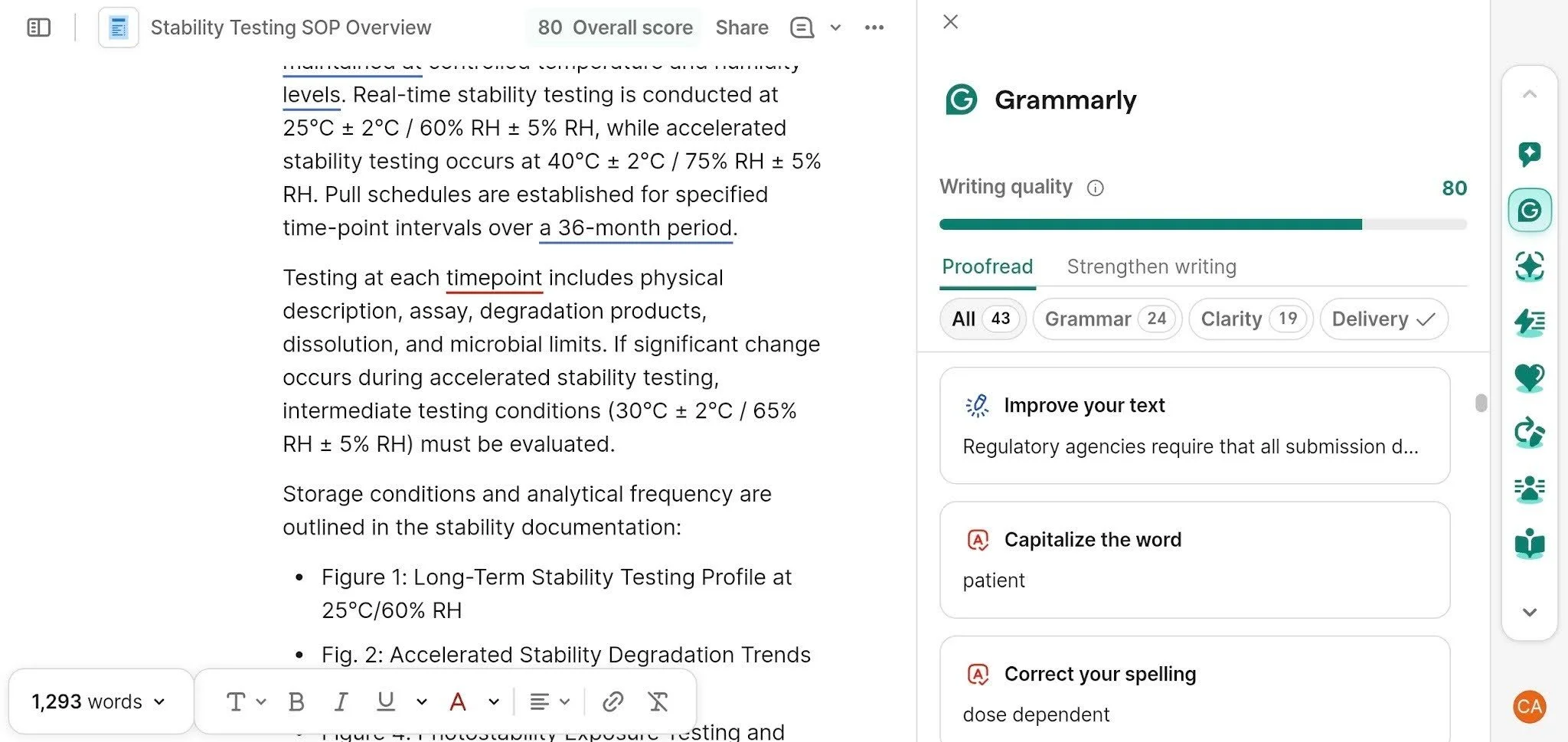
Grammarly Pro is an AI writing assistant that checks grammar, spelling, tone, and clarity as you type or across a finished document. It also adds generative AI and team features.
For the writing itself, it rewrites full sentences for you to accept or ignore, adjusts tone for a specific reader, and gives fluency help for English. Pro also includes a plagiarism checker and AI-generated text detection.
On the AI side, each member gets 2,000 prompts a month. Pro also includes AI agents that help you brainstorm and show how a reader might react to your draft. Across a whole document, it suggests fixes for dates, capitalization, spelling, hyphens, and acronyms, shown alongside its grammar and tone suggestions.
For teams, Pro adds one style guide, one brand tone, user groups, Knowledge Share, snippets, and team analytics. The style guide holds your terminology, capitalization, and brand names, and Grammarly suggests them in context as you write. Snippets store reusable text, such as a standard company description.
Its biggest practical strength is coverage. Grammarly Pro works in browsers and in desktop apps, including Word, Outlook, and PowerPoint, so you get the same help in an email, a web form, or a slide deck.
Where Grammarly Pro fits
Grammarly Pro suits teams that write in different apps every day and want help with grammar, clarity, and tone.
Client communications are a good example, along with emails, marketing copy, and first drafts where speed and readability matter more than anything else. A sales team answering prospects all day, or a marketing team drafting a landing page before lunch, gets the most from the quick suggestions and rewrites.
In those settings the writing itself is what needs work, and Grammarly Pro is built for that task.
Larger organizations can look at Grammarly Enterprise. It adds unlimited style guides and brand tones, SAML single sign-on, data loss prevention, and BYOK (bring your own key) encryption. Enterprise is custom priced, so you need to talk to Grammarly’s sales team for a quote.
What PerfectIt Does
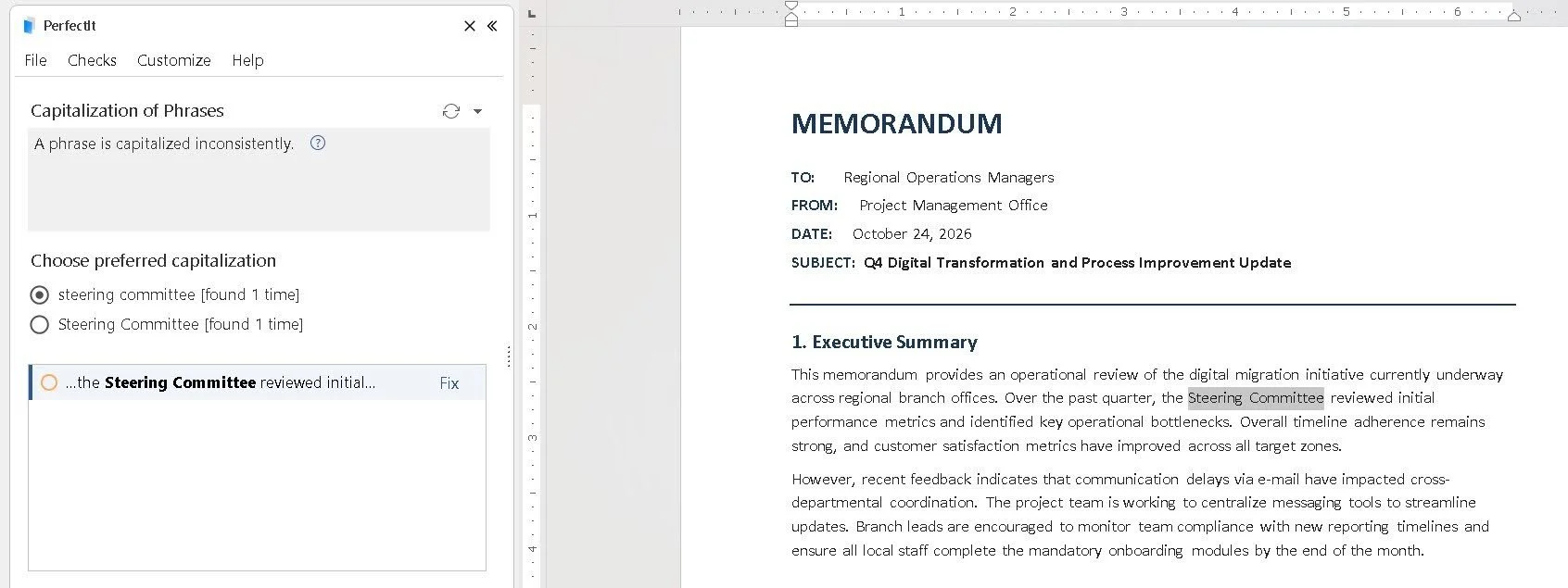
PerfectIt checks consistency and house style across the whole document. It doesn’t check grammar, it doesn’t write or rewrite text, and it’s not AI.
PerfectIt runs as a Microsoft Word add-in. You click PerfectIt in the ribbon, then Launch PerfectIt, and it opens next to your document. It checks the whole document at once and works through the results in one sidebar, one check at a time.
It flags each location and leaves the decision to you, and it never changes text on its own.
PerfectIt has 20,000 users in 72 countries. It’s also the only official proofreading software of The Chicago Manual of Style and of Microsoft Writing Style. Being the official software means each guide's rules are built into PerfectIt itself, so the checking follows the guide and doesn’t approximate it. Checking against The Chicago Manual of Style needs a separate CMOS Online subscription.
The consistency checks
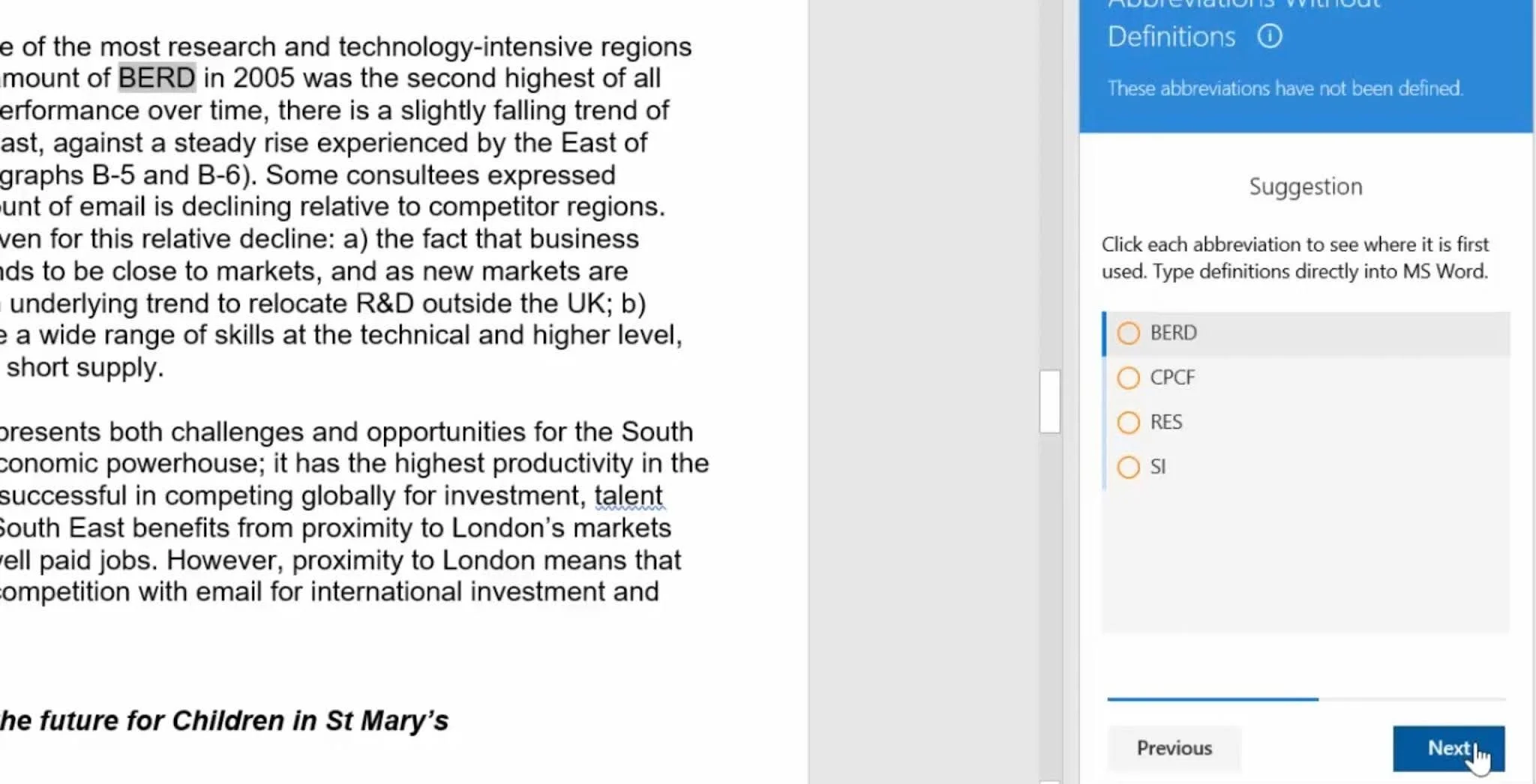
PerfectIt finds the places where a document cannot be right. If "mark-up" appears in one location and "markup" in another, only one of them can be correct for that document.
Each check covers one kind of inconsistency:
Capitalization: flags a term with initial capitals in one location and lowercase in another, such as “Steering Committee” on one page and “steering committee” on the next.
Hyphenation: finds words and phrases hyphenated in one place but not in another, such as "cofounder" and "co-founder".
Bullet and list capitalization and punctuation: flags lists that are capitalized or punctuated inconsistently. It flags inconsistency, not difference, because an item on a list can legitimately end on a different kind of punctuation mark, and a proper name is a good reason for one item to carry capitals in a list of lowercase items. PerfectIt flags the location of the inconsistency so you can decide which are intentional.
Spelling: catches mixed US and UK spellings, such as "center" in the same document as "centre".
Numbers in sentences: flags numbers inside sentences when a spelled-out form like "six" appears in one place and a digit like "7" in another. This is a separate check from spelling.
Tables and figures: checks that tables and figures are titled consistently and appear in numerical order.
These consistency checks are especially important in multi-author documents. When multiple contributors collaborate on a single document, each person brings their own naming and capitalization habits, causing style choices to drift across the draft.
These are also the most common consistency mistakes, and a spellchecker won’t catch them. A reviewer reading under deadline may miss them too.
Acronym definitions
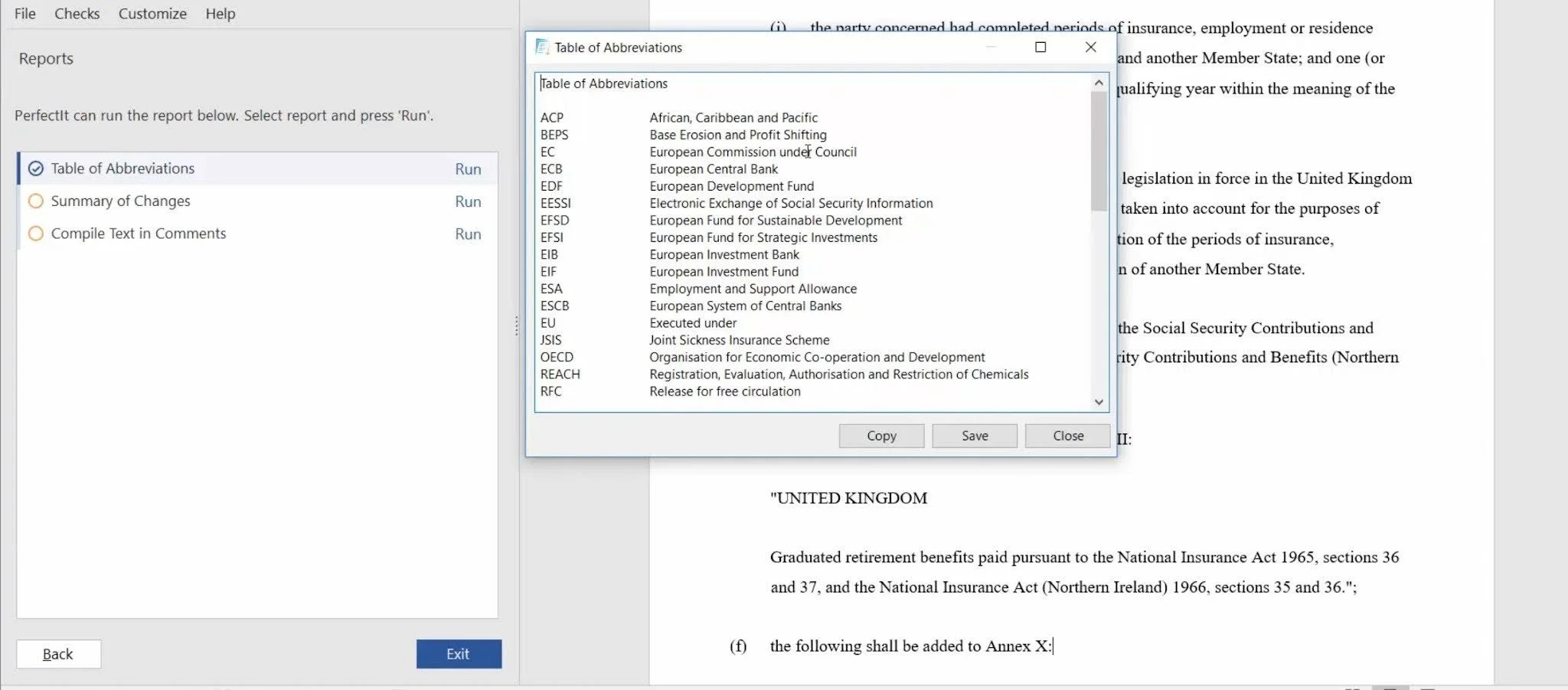
Acronym checking is one of the main reasons proposal and medical writing teams rely on PerfectIt. It finds acronyms used before they are defined, acronyms defined twice, and acronyms that have never been defined. None of this uses AI. PerfectIt can also generate a table of acronyms for you.
Take a bid response where an acronym appears in the executive summary with no definition. The evaluator reading it either stops to work out what it means or guesses, and either way the bid loses a little of their confidence. PerfectIt flags that location before the document goes out.
House style
Your team already has a house style, and PerfectIt makes it easier to enforce on every document.
A good house style doesn’t restate every rule in the language. It starts from a published guide, such as The Chicago Manual of Style, and sets out only the points where your organization does something different. Those points can include brand names, preferred spellings, and terms that have to be written one particular way.
If you’re putting a house style together for the first time, what makes a great corporate house style is a useful reference. You build those preferences into PerfectIt once in Styleworks, then apply them to every document.
PerfectIt’s consistency checking doesn't require any configuration. It catches mistakes straight out of the box. You also get to have built-in styles such as US, UK, Canadian, and Australian spelling, plus organizational styles such as United Nations, WHO, and the US Government Publishing Office.
Confidentiality and Data Handling
This is the clearest difference between the two tools. Grammarly Pro is a cloud service that needs an internet connection. PerfectIt for Windows works entirely offline and never sends your documents anywhere.
How Grammarly Pro handles your text
Grammarly Pro processes your text in the cloud, so your text leaves your computer every time you use Grammarly. Grammarly hosts that data on Amazon Web Services servers in the US. It encrypts the data in transit with TLS and at rest with AES-256, and the service needs an internet connection to work.
Grammarly also lets you control how your content is used. A setting called Product Improvement and Training decides whether Grammarly can use your content to improve and train its own models.
It’s on by default for individual accounts, single-user Pro accounts, and multi-user Pro accounts bought on Grammarly's website. A user or an admin can switch it off. It is off by default for Enterprise, Education, and Pro accounts bought through Grammarly's sales team.
Grammarly states that it doesn’t sell your content, and that third parties cannot use it to train their models. Admins can use this setting to set a policy for the whole organization.
The point for teams handling confidential documents is a narrower one. Even with training switched off, the text still has to leave the computer to be processed. For unpublished clinical data or a bid with confidential pricing, that can be a deal breaker.
How PerfectIt handles your documents
PerfectIt for Windows works entirely offline. It never connects to the internet, and your documents are never sent anywhere, for any reason.
PerfectIt Mac Edition keeps your documents on your computer. And because PerfectIt is not AI, your documents are never used for training and never go to an outside model. PerfectIt's security brief has the full detail if your IT team needs it.
For pharmaceutical, government, and proposal teams handling confidential documents, this is why corporate approval is easier to get for PerfectIt. The security review has less to cover when the tool doesn’t send your documents anywhere.
Kimberli Balfour, Senior Proposal Manager at Microsoft Corporation, described the buying decision this way: "PerfectIt's inexpensive pricing and security model made it easier to get corporate approvals."
AI Suggestions vs Rules Applied the Same Way Every Time
Grammarly Pro uses AI to suggest and generate text. PerfectIt applies your rules the same way every time, so the same document gives the same result on every check.
Both approaches have a place. Generative AI works from probabilities, so the rewrite it offers for a sentence today can differ from the one it offers tomorrow. That variety helps when you are drafting and want options to choose from. Grammarly Pro does this well, and it’s what it is built for.
Reviewing a finished specialist document is a different task. A team signing off on a clinical study report or a bid needs to know that the rule applied in section 2 is the rule applied in section 9. It also needs a second check after revisions to give a result it can rely on. PerfectIt works this way because it is rules-based: it applies the rules you set, the same way each time, with no guessing about what you meant.
If your house style writes a product name one way, every location that writes it another way is flagged, in every section and every revision.
AI-assisted drafting makes this more important. As teams draft more with AI, terminology and consistency drift get harder to control. Each contributor, and each prompt, produces its own wording, and a document assembled from them reads that way.
PerfectIt catches that drift after the drafting is done. It doesn’t write or rewrite anything, and it never changes text on its own. It flags the location and leaves the decision to you, which makes it the quality control step for AI-assisted work and not part of the AI itself.
If you want the wider picture, there is a longer discussion of whether AI can replace human copy editors.
Grammarly Pro vs PerfectIt: Where Each Tool Leads
Grammarly Pro has the edge on writing help and coverage across apps. PerfectIt has the edge on consistency, house style, and confidentiality.
Grammar and writing help
Grammarly Pro leads here. Grammar, clarity, tone, and rewrites are its core task, and it handles them across almost any app. PerfectIt doesn’t check grammar, by design, so it’s not the tool for polishing individual sentences.
Whole-document consistency
PerfectIt is the more focused tool for consistency. Grammarly Pro can review a whole document and has consistency features, but it shows them alongside AI writing help and general grammar suggestions, much of which users already get from Microsoft Editor. PerfectIt goes straight to the hardest mistakes to find, consistency and house style, and works through the document one check at a time.
House style
Both tools can hold house style rules. Grammarly Pro includes one style guide, and Enterprise removes that limit. PerfectIt is built around house style: it has the official partnerships with The Chicago Manual of Style (checking against Chicago needs a separate CMOS Online subscription) and Microsoft Writing Style, and you build your own preferences into PerfectIt in Styleworks.
Confidentiality
PerfectIt leads here as PerfectIt for Windows works entirely offline, so it doesn’t send your text or data anywhere.
Coverage across apps
Grammarly Pro leads on coverage because it works almost everywhere you type, including browsers, Word, Outlook, PowerPoint, and many other apps. PerfectIt works in Word, and in PowerPoint on Windows with the Elite, Team, or Enterprise plan. If your team's specialist documents live in Word and PowerPoint, that covers them. If your writing happens in many other places too, Grammarly Pro reaches further.
Pricing
Grammarly Pro pricing
Grammarly Pro costs $12 per member a month, billed annually, or $30 per member a month, billed monthly. It covers up to 149 seats, and a free trial is available. Pro includes one style guide and one brand tone. Teams that need more of either need Enterprise, which is custom priced through Grammarly's sales team.
PerfectIt pricing
PerfectIt is an annual, per-user subscription with four plans. Prices start at $10 per user a month, billed annually.
Professional: $10 a month ($115 a year). Word only.
Elite: $12 a month ($145 a year). With PowerPoint.
Team: $13 a month ($155 a year), for 3 to 100 users, with volume discounts. With live, expert-led training.
Enterprise: $583 a month or $7,000 a year. Adds a dedicated account manager, deployment support, and an installer portal.
Discounts are available for members of professional associations. Prices change, so check the live store before you budget.
PerfectIt offers a 14-day free trial that gives you full access. It asks for an email address and nothing else: no purchase, no credit card, and no other personal information.
To talk through plans for your team, book a demo or consultation.
Pros and Cons
PerfectIt
Pros
Checks consistency and house style across the whole document.
Checks acronym definitions without using AI.
Generates a table of acronyms for you.
PerfectIt for Windows works entirely offline.
Gives the same result on every check.
Is the official software of The Chicago Manual of Style and Microsoft Writing Style.
Works inside Word, and inside PowerPoint on Windows with the Elite, Team, or Enterprise plan.
Con
It doesn’t check grammar or rewrite sentences. This is a deliberate design choice. It keeps PerfectIt focused on consistency and house style, and it never changes your text on its own.
Grammarly Pro
Pros
Strong grammar, clarity, and tone help.
Reviews the whole document and makes consistency suggestions.
Includes generative AI and AI agents.
Works across almost every app you write in.
Includes a team style guide, a brand tone, and analytics.
Cons
Needs an internet connection and processes your text in the cloud.
Product Improvement and Training, which lets Grammarly use your content to improve and train its models, is on by default for single-user Pro accounts and for multi-user Pro accounts bought on Grammarly's website, until someone switches it off.
Pro is limited to one style guide and one brand tone. More need Enterprise.
Which Is Better for Your Team?
For confidential specialist documents that have to follow a house style, PerfectIt is the better choice. For general writing help across many apps, Grammarly Pro is the stronger tool. Everyday users tend to prefer Grammarly, while specialists who already have strong language skills, such as proposal writers, medical writers, and government publications teams, choose PerfectIt.
Medical writing teams
Clinical study reports, protocols, and regulatory submissions depend on exact terminology. “Patient”, “participant”, and “subject” are not interchangeable in a clinical trial, and the protocol sets which one a study uses.
Multi-author documents tend to stray from the protocol's terminology. Once you build the protocol’s term into your preferences, PerfectIt flags every location that uses a different one.
Medical writers usually follow AMA style, and you can build your AMA preferences into PerfectIt. PerfectIt for Windows works entirely offline, which keeps unpublished data on your computer. The benefit of PerfectIt is less time on mechanical fixes, so you can focus on the science.
Proposal and bid teams
A proposal written by many contributors should read as if it’s written with one voice. PerfectIt checks terminology, capitalization, and acronyms across every contributor's section, and acronym checking is one of the main reasons proposal teams buy it.
The result is a better impression on evaluators and less time on mechanical corrections, so you can focus on your message. Manisha Kaneri, Publishing Team Lead at BidExecs, puts it this way: "For proposal work, PerfectIt is the best in its class."
Government publications teams
PerfectIt checks compliance with your style guide across the whole document, including acronym definitions and the capitalization and punctuation of lists. Built-in options include US Government Publishing Office (GPO), European Union, and United Nations styles.
US teams can also use the partnership with The Chicago Manual of Style, which requires a separate CMOS Online subscription.
If confidentiality, house style, and consistency are the priorities for your team, PerfectIt is the stronger choice.
Frequently Asked Questions
Is PerfectIt better than Grammarly Pro?
For consistency and house style across confidential specialist documents, yes. Grammarly Pro is stronger for grammar, tone, and AI writing help across many apps.
Is Grammarly Pro worth it for professional teams?
Grammarly Pro is worth it for teams that want writing help in many apps. Teams whose priority is confidential documents and house style compliance get more from PerfectIt.
Does Grammarly Pro work offline?
No. Grammarly is an online application that needs an internet connection and processes your text in the cloud. PerfectIt for Windows works entirely offline.
Does PerfectIt use AI?
No. PerfectIt applies your rules the same way every time, does not generate or rewrite text, and never sends your documents to an AI model.
Can PerfectIt enforce our house style?
Yes. You build your preferences into PerfectIt once in Styleworks, then apply them to every document in Word, and in PowerPoint on Elite, Team, and Enterprise.
Final Verdict
Writing a document and checking it are different tasks, and each tool is good at a different one. For consistency and house style, with your documents kept offline, PerfectIt is the better choice for professional teams. For grammar and AI writing help across many apps, Grammarly Pro is the stronger tool.
PerfectIt suits medical writing, proposal, and government publications teams that handle confidential specialist documents. These teams follow a house style, work with many contributors, and need their documents to stay on their own computers.
PerfectIt doesn’t check grammar or rewrite text. That is by design, and it keeps PerfectIt focused on consistency and house style.
To see how PerfectIt would work for your team's documents, book a demo or consultation today.
